
You are commissioning a new industrial control cabinet. The pressure transmitter has been installed, the wiring is connected, and the PLC is running. Everything appears ready—until you check the HMI.
The pressure reading remains at zero, fluctuates unexpectedly, or displays a value that does not match the actual process.
Where should you begin?
Is the transmitter defective? Is there a loose terminal connection? Has the PLC analog input module been configured incorrectly?
Replacing components without checking the signal can waste time and create additional problems.
With a suitable Digitalmultimeter, you can systematically troubleshoot the signal path from the field transmitter through the wiring to the PLC analog input.
This guide explains how 4–20mA current loops work, introduces three practical measurement techniques, and provides a quick reference for interpreting abnormal readings.
It also explains how to verify PLC analog input scaling and select suitable electrical measurement instruments for industrial maintenance.
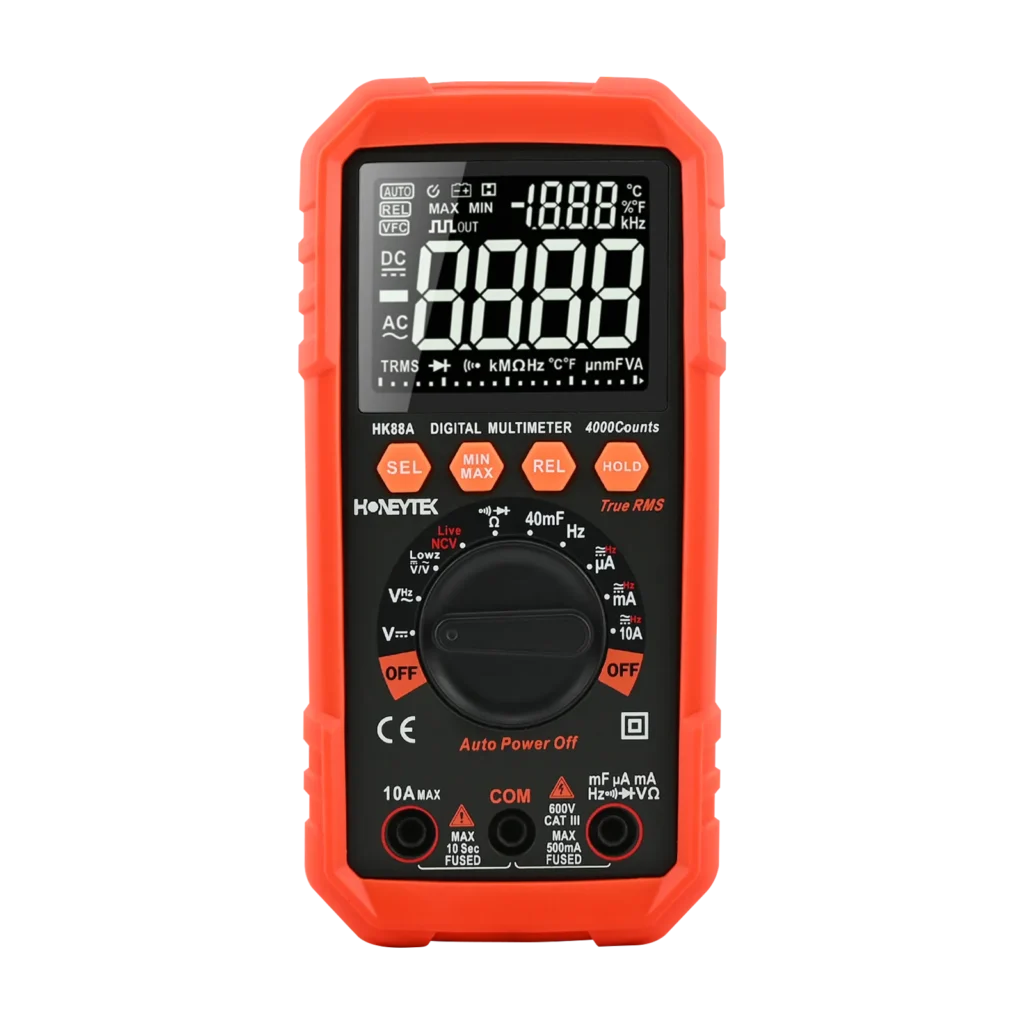
1. Understanding the 4–20mA Current Loop
The 4–20mA current loop is widely used in industrial automation to transmit analog process information from sensors and transmitters to control equipment.
Typical applications include pressure, temperature, flow, liquid level, and other process measurements.
Unlike voltage-based signals, a current loop regulates the amount of current flowing through a series circuit.
This allows the transmitted signal to remain relatively consistent despite variations in cable resistance, provided the available supply voltage is sufficient to drive the total loop load.
Current loops also offer practical advantages in industrial environments where long cables, electrical equipment, and electromagnetic interference can complicate signal transmission.
However, proper cable routing, shielding, grounding, and voltage-budget calculations remain important.
Why Does a 4–20mA Signal Start at 4mA?
The lower limit of 4mA is known as a live zero.
In a standard linear 4–20mA measurement range:
- 4mA represents 0% of the configured process span.
- 12mA represents 50% of the span.
- 20mA represents 100% of the span.
Unlike a 0–20mA signal, a 4–20mA loop can distinguish a legitimate zero-process reading from a complete loss of loop current.
For example, a measurement close to 0mA may indicate an open circuit, disconnected cable, missing power supply, or another loop fault.
Values slightly outside the nominal 4–20mA range require more careful interpretation because some transmitters intentionally output under-range, over-range, or diagnostic currents.
Converting 4–20mA into a Percentage
For a linear transmitter:
Process Span (%) = [(Measured Current − 4mA) / 16mA] × 100
The active measurement span is 16mA, meaning each 1mA corresponds to 6.25 percentage points of the configured process span.
| Current Signal | Percentage of Span | Interpretation |
|---|---|---|
| 4mA | 0% | Lower range value |
| 8mA | 25% | Quarter-scale |
| 12mA | 50% | Mid-scale |
| 16mA | 75% | Three-quarter scale |
| 20mA | 100% | Upper range value |
For example, consider a pressure transmitter configured for 0–10 bar.
If the output is 12mA, the calculated pressure is 5 bar, assuming linear scaling.
Components of a Typical 4–20mA Loop
A common two-wire current loop includes:
- A 24V DC power supply
- A loop-powered field transmitter
- Signal cables and terminal connections
- A PLC or DCS analog input module
Two-wire transmitters use the same circuit for operating power and measurement signal transmission.
Some analog input modules use an internal precision sensing resistor, often around 250Ω, to convert current into a measurable voltage.
When a 250Ω resistor is used:
- 4mA produces 1V.
- 12mA produces 3V.
- 20mA produces 5V.
Not all analog input modules use a 250Ω resistor or expose its terminals. Always consult the module documentation before selecting a measurement method.
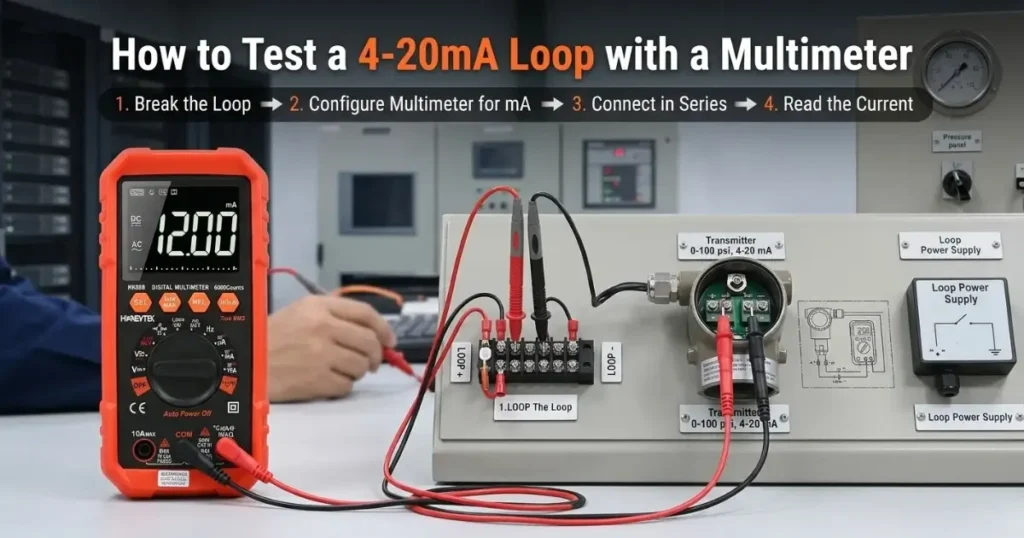
2. Preparing Your Digitalmultimeter for 4–20mA Testing
Before troubleshooting a control loop, verify that your measuring instrument is suitable for low-level DC current measurements.
A digital multimeter with a dedicated milliampere range is generally more appropriate than relying on a high-current ampere range.
Select the Correct Measurement Range
For direct current measurement:
- Select the DC mA function.
- Insert the black test lead into the COM terminal.
- Insert the red test lead into the correctly rated mA input terminal.
- Choose a range that accommodates at least 20mA, including possible fault currents.
- Verify the instrument’s resolution, accuracy, and input protection.
A meter with a 60mA DC range, for example, may be suitable for measuring nominal 4–20mA signals when its specifications meet the required measurement accuracy.
The A range is not automatically incorrect, but a high-current range often provides less useful resolution for evaluating small process signal variations.
Check the Meter’s Fuse and Input Protection
Many digital multimeters protect their milliampere input using a replaceable fuse.
A blown fuse can interrupt an attempted series measurement or cause misleading troubleshooting results.
Check the instrument using the manufacturer’s recommended procedure, including fuse inspection and functional verification where applicable.
Never bypass a protective fuse.
Follow Safe Testing Procedures
Important: A multimeter in current mode must be connected in series with the loop, never directly across an energized power supply or signal source.
Connecting a current-input terminal across a voltage source can create a short circuit and may damage equipment or cause injury.
Before opening a circuit:
- Obtain authorization from the responsible operator.
- Identify whether the loop performs a safety-critical function.
- Follow site isolation and lockout/tagout procedures.
- Verify the absence of hazardous voltage where required.
- Check the instrument and test leads for damage.
- Confirm the correct input terminals and measurement function.
Never interrupt a live safety-related process loop merely to obtain a measurement.
3. Method One: Measure 4–20mA Current in Series
Series measurement is a direct way to measure the current flowing through an industrial sensor loop.
The digital multimeter temporarily becomes part of the circuit, allowing the loop current to pass through the meter’s current-measuring input.
Step-by-Step Procedure
Step 1: Identify the Loop Wiring
Consult the control cabinet wiring diagram and transmitter documentation.
Locate the 24V supply, transmitter terminals, signal return, and PLC analog input connections.
Confirm whether the analog input is active or passive and whether the transmitter is a two-wire, three-wire, or four-wire type.
Step 2: Arrange a Safe Interruption
Obtain permission to interrupt the loop.
Where required, isolate and verify the circuit before disconnecting the wiring.
Remember that opening the loop may trigger an alarm, process shutdown, or control action.
Step 3: Insert the Multimeter
Disconnect one accessible series connection in the loop.
Connect one multimeter lead to the disconnected wire and the other to its original terminal so that the meter bridges the opened connection in series.
Observe the meter’s polarity indication. The red lead should be oriented toward the higher-potential side of the measuring path if a positive reading is desired.
Terminal designations vary among installations; do not assume all signal terminals marked “+” have identical electrical functions.
Step 4: Energize and Read the Current
After verifying the connection and obtaining authorization, restore loop power.
Observe the DC current displayed by the multimeter.
A working transmitter operating within its nominal measurement range will normally provide approximately 4–20mA.
Step 5: Restore the Original Circuit
After recording the measurement, isolate the circuit as required, remove the multimeter, and restore the original wiring.
Check the terminal connections and confirm that the loop and HMI have returned to their expected operating condition.
How to Interpret the Measurement
| Multimeter Reading | Process Span | Possible Meaning |
|---|---|---|
| 4.000mA | 0% | Process at configured lower range |
| 8.000mA | 25% | Process at quarter-scale |
| 12.000mA | 50% | Process at mid-scale |
| 16.000mA | 75% | Process at three-quarter scale |
| 20.000mA | 100% | Process at configured upper range |
These values assume a linear transmitter without additional signal processing.
Advantages and Limitations
Advantages:
- Measures actual loop current directly.
- Supports detailed transmitter and wiring diagnostics.
- Suitable for commissioning and controlled maintenance.
Limitations:
- Requires opening the loop.
- May interrupt PLC input monitoring.
- Can affect process operation.
- Adds the meter’s burden voltage to the circuit.
For operating production lines where interruption is not acceptable, a non-intrusive method may be more appropriate.
4. Method Two: Measure Voltage Across a Known Sensing Resistor
When an accessible, known sensing resistor is available, a digital multimeter can estimate loop current by measuring the DC voltage across it.
This method applies Ohm’s law:
Voltage = Current × Resistance
For a 250Ω resistor:
Current (mA) = Voltage (V) × 4
Therefore:
| Voltage Across 250Ω | Equivalent Current | Process Span |
|---|---|---|
| 1.000V | 4mA | 0% |
| 2.000V | 8mA | 25% |
| 3.000V | 12mA | 50% |
| 4.000V | 16mA | 75% |
| 5.000V | 20mA | 100% |
Step-by-Step Procedure
Step 1: Review the PLC analog input module’s wiring and technical documentation.
Step 2: Confirm whether the module uses an accessible sensing resistor and identify its resistance value.
Step 3: Set the multimeter to DC voltage mode and connect the leads to the voltage measurement terminals.
Step 4: Measure the potential difference directly across the specified resistor or manufacturer-approved measurement points.
Step 5: Convert the measured voltage into current using the verified resistance value.
Example
Suppose the voltage measured across a 250Ω resistor is 3.005V.
The corresponding current is:
3.005V / 250Ω = 0.01202A
Equivalent loop current = 12.02mA
This corresponds to approximately 50.125% of the configured measurement span.
Advantages and Limitations
Advantages:
- May allow measurement without opening the current loop.
- Uses the multimeter’s DC voltage function.
- Helpful when suitable test points are accessible.
Limitations:
- Depends on knowing the actual sensing resistance.
- Some PLC modules use different resistor values or electronic current-sensing circuitry.
- Input terminals do not necessarily provide direct access to an internal sensing resistor.
- An incorrectly selected reference point can produce misleading readings.
If the analog input resistance is 100Ω rather than 250Ω, a 12mA signal produces 1.2V instead of 3V.
Always confirm the electrical design before interpreting voltage measurements.
5. Method Three: Use a Specialized DC Milliamp Clamp Meter
For non-intrusive loop testing, a purpose-built DC milliamp clamp meter can measure small DC currents without opening the circuit.
This method is useful when a production process cannot be interrupted or multiple sensor loops must be inspected.
How to Measure 4–20mA with a Clamp Meter
- Select a clamp meter specifically designed for DC milliamp-level measurements.
- Perform the recommended zero adjustment before measuring.
- Position the clamp around a single loop conductor.
- Follow the instrument’s orientation instructions.
- Record the current and compare it with the PLC analog input value.
Why Must You Clamp Only One Wire?
If both the outgoing and returning conductors pass through the clamp, their magnetic fields largely cancel because the currents flow in opposite directions.
This can produce a reading close to zero even when the loop is functioning normally.
Important Equipment Selection Note
Standard AC/DC clamp meters are generally designed for much larger currents and should not be assumed capable of resolving a 4–20mA process signal.
For example, an industrial clamp meter intended for measuring hundreds of amperes is not automatically suitable for milliamp-level loop diagnostics.
Always check the DC milliamp measurement range, resolution, and accuracy before selecting a clamp meter for this task.
For Honeytek customers, the appropriate choice depends on the required measuring function. Honeytek provides a range of digital multimeters and clamp meters, while specialized DC milliamp clamp capability should be confirmed against the current product specifications.
6. Practical Tip: Converting Loop Current into Percentage
Some process multimeters offer a dedicated 4–20mA percentage display function.
Instead of manually calculating the current value as a percentage of the configured measurement span, the instrument displays the corresponding percentage directly.
This can simplify commissioning and troubleshooting.
Quick Conversion Table
| Current | Percentage |
|---|---|
| 3.6mA | −2.5% |
| 4mA | 0% |
| 8mA | 25% |
| 12mA | 50% |
| 16mA | 75% |
| 20mA | 100% |
| 20.8mA | 105% |
Example: A transmitter outputs 12.02mA.
Percentage = [(12.02 − 4) / 16] × 100
Result: 50.125%, or approximately 50.1%.
For a transmitter configured to measure 0–10 bar, this corresponds to approximately 5.01 bar.
That does not by itself confirm sensor accuracy; it confirms the engineering value expected from the measured electrical signal under the assumed scaling.
Understanding Values Outside the Nominal Range
A percentage below 0% or above 100% does not necessarily mean the transmitter has failed.
Some process instruments permit limited under-range and over-range measurement.
For transmitters configured in accordance with NAMUR NE 43, a low fault signal is commonly at or below 3.6mA, while a high fault signal is commonly at or above 21mA.
The actual alarm behavior depends on the transmitter and PLC configuration.
What If Your Multimeter Does Not Have Percentage Display?
You can still measure the current normally and calculate the percentage using the formula above.
When choosing a digital multimeter, distinguish between a general percentage or relative measurement function and a dedicated 4–20mA process percentage mode.
These are not necessarily equivalent.
7. Quick 4–20mA Loop Troubleshooting Chart
When the PLC analog input shows an unexpected value, use the measured loop current to narrow down possible causes.
| Measured Signal | Possible Cause | Recommended Action |
|---|---|---|
| Approximately 0mA | Open circuit, disconnected terminal, missing loop power, incorrect polarity, or open meter fuse | Check the 24V supply, loop continuity, terminal connections, and instrument fuse |
| At or below 3.6mA | Transmitter fault output or severe loop problem | Review transmitter diagnostics and supply voltage |
| 3.6–4mA | Low under-range or configuration issue | Verify sensor zero, process conditions, and transmitter settings |
| Stable 4–20mA, but PLC value incorrect | Incorrect channel type, PLC scaling, or HMI configuration | Compare measured current with PLC raw input and engineering units |
| Around 12mA | Mid-range process value in a linear loop | Verify the expected 50% process value |
| 20–20.5mA | Upper end of nominal or extended measurement range | Check actual process conditions and transmitter range |
| At or above 21mA | Transmitter high-fault signaling or other abnormal condition | Check transmitter fault configuration and diagnostics |
| Fluctuating current | Loose terminals, unstable supply, process fluctuations, or interference | Inspect wiring, shielding, grounding, and process stability |
| Correct loop current but HMI remains at zero | PLC channel disabled, input configuration fault, scaling issue, or logic error | Check the AI module diagnostics, raw count, PLC program, and HMI tag |
A Practical Troubleshooting Sequence
Imagine a pressure transmitter produces 12.00mA, but the HMI displays zero.
First, confirm that the PLC input channel is configured for the correct 4–20mA input type.
Next, check the raw analog input value.
If the raw value correctly represents approximately 50% of the configured input span, the fault is more likely located in the PLC scaling logic, tag mapping, or HMI configuration than in the transmitter itself.
If the PLC raw input remains at zero while a valid current reaches the module, investigate channel configuration, terminal assignment, wiring, and module diagnostics.
This progressive approach helps isolate problems without replacing functioning components.
8. Advanced Testing: Verify the Complete PLC Analog Input Chain
Measuring transmitter current confirms an important part of the signal path, but it does not fully verify the PLC measurement system.
For more complete commissioning, use a suitable process signal source or loop calibrator to apply known current values to the analog input.
Five-Point PLC Analog Input Verification
A typical linearity and scaling check uses five input points:
| Injected Current | Expected Percentage | Example: 0–10 bar |
|---|---|---|
| 4mA | 0% | 0 bar |
| 8mA | 25% | 2.5 bar |
| 12mA | 50% | 5 bar |
| 16mA | 75% | 7.5 bar |
| 20mA | 100% | 10 bar |
Recommended Procedure
Step 1: Obtain authorization and isolate the process input according to the commissioning procedure.
Step 2: Disconnect or isolate the transmitter from the input channel as required.
Step 3: Connect a compatible, properly configured 4–20mA current source or loop calibrator.
Step 4: Inject the selected test currents.
Step 5: Compare the PLC raw value, converted engineering value, and HMI reading with the expected results.
Step 6: Restore the original connection and verify normal operation.
A standard digital multimeter does not necessarily generate a controlled 4–20mA signal. Signal injection requires a dedicated source or calibrator with the correct electrical configuration.
Understanding HART Loop Resistance
For HART-enabled instruments, the loop may require a minimum load resistance to support digital communication.
A 250Ω resistor is commonly associated with HART communication requirements, but the appropriate resistance and connection arrangement depend on the installed equipment.
Before modifying a HART loop, review the transmitter and communication device documentation to ensure the total loop load and available voltage remain within specification.
Maintain Your Measuring Equipment
Routine instrument maintenance supports consistent troubleshooting results.
Recommended practices include:
- Inspecting test leads and terminals.
- Checking current-input fuses.
- Verifying instrument condition before use.
- Following the specified calibration interval.
- Recording calibration and inspection results.
- Replacing damaged accessories with correctly rated components.
For measurements where traceable accuracy is required, follow the site’s calibration and quality procedures.
9. Choosing a Digitalmultimeter for Industrial PLC Maintenance
When selecting an instrument for 4–20mA loop troubleshooting, focus on the actual measurement requirements rather than the number of advertised functions.
Key Features to Consider
DC Milliamp Measurement
The instrument should support the intended DC milliamp range and provide adequate resolution and accuracy.
DC Voltage Measurement
Voltage measurement is useful for checking 24V supplies, accessible sensing resistors, and transmitter supply conditions.
Input Protection
Appropriate current-input fusing, lead ratings, and electrical safety features are essential for field maintenance.
Display Readability
A readable display, backlight, and data-hold function can improve convenience in crowded control cabinets.
Measurement Accuracy
Small differences in loop current may matter during calibration and diagnostics. Compare the instrument’s published DC current accuracy and resolution with the application’s acceptance limits.
Safety Ratings
Choose an instrument with ratings suitable for the installation and measurement environment. The appropriate CAT rating must be considered together with rated voltage and actual connection points.
Honeytek Digital Multimeters for Electrical Measurement
Honeytek manufactures a selection of handheld digital multimeters and related test instruments for industrial maintenance and electrical testing applications.
One example is the Honeytek HK88B True RMS Digital Multimeter, which includes DC current measurement ranges suitable for general low-level electrical measurement applications.
The HK88B provides:
- 6,000-count display
- True RMS AC measurement
- DC current measurement with a 60mA range
- AC/DC voltage measurement
- Resistance and capacitance measurement
- Frequency and temperature functions
- Data hold and other measurement functions
- CAT III 600V rating as specified for the model
Its published DC current specifications include a 60mA range with a stated accuracy of ±(1.0% of reading + 5 digits).
For 4–20mA loop work, users should assess the meter’s resolution, published accuracy, burden voltage, and input protection against their required diagnostic precision.
The HK88B is a digital multimeter, not a dedicated process signal source or milliamp clamp meter.
Explore the product: Honeytek HK88B Digital Multimeter
10. Honeytek: Digital Multimeter OEM/ODM Manufacturing
Honeytek is a manufacturer of electronic test and measurement instruments, providing products for electrical maintenance, industrial applications, and international distribution.
Its product portfolio includes:
- Digital multimeters
- Clamp meters
- Insulation resistance testers
- Two-pole voltage testers
- Solar PV testing instruments
- Thermal imagers
- Automotive diagnostic instruments
- Other handheld electrical and environmental testing equipment
In addition to standard products, Honeytek provides OEM/ODM services for international instrument brands, distributors, and wholesale buyers.
Depending on the model and project requirements, customization options may include private-label branding, packaging, manuals, housing configurations, and selected product development modifications.
For businesses sourcing instruments for industrial maintenance and automation markets, selecting suitable measuring ranges, safety features, and product configurations is an important part of the procurement process.
Honeytek works with customers to review product requirements and discuss manufacturing options based on the intended application.
Learn more: Honeytek Website
11. Frequently Asked Questions
Can I measure a 4–20mA loop with a regular digital multimeter?
Yes, provided the multimeter has a suitable DC current range and adequate accuracy and input protection. For direct current measurement, it must be inserted in series with the loop.
Can I test a 4–20mA signal without disconnecting the wires?
Sometimes. You may measure the voltage across an accessible sensing resistor of known value or use a specialized DC milliamp clamp meter. Both approaches require suitable equipment and an understanding of the circuit.
What does 12mA mean in a 4–20mA loop?
For a linearly configured transmitter, 12mA represents 50% of the measurement span. The corresponding engineering value depends on the configured lower and upper range values.
Why is my PLC reading zero when the transmitter has power?
Possible causes include a missing loop-current path, incorrect active/passive input wiring, a disabled analog input channel, incorrect scaling, or a PLC/HMI configuration issue. Transmitter power alone does not confirm that the PLC is receiving valid current.
What happens when a 4–20mA loop is disconnected?
A complete open circuit normally interrupts loop current. Depending on the PLC configuration, the control system may display a low reading, diagnostic alarm, substituted value, or last valid value.
Can a standard clamp meter measure 4–20mA?
Most standard high-current clamp meters are not intended for precise milliamp-level DC measurement. Use a clamp meter specifically designed and specified for DC milliamp loop testing.
What is the purpose of a 250Ω resistor in a 4–20mA loop?
A 250Ω resistor produces a voltage drop of 1–5V across the nominal 4–20mA range. Such resistors may be used for analog current sensing or to help satisfy certain HART communication requirements. Actual configurations vary by equipment.
What type of multimeter should industrial maintenance technicians choose?
Look for suitable DC milliamp and voltage measurement ranges, adequate resolution and accuracy, appropriate electrical safety ratings, accessible test functions, and dependable input protection. The final selection should reflect the installation environment and required diagnostic precision.
Conclusion: Diagnose 4–20mA Loop Problems Systematically
Troubleshooting a 4–20mA loop becomes more manageable when you understand the signal range, select the correct measurement function, and verify each part of the control system in sequence.
Series current measurement provides a direct reading. Voltage measurement across a known sensing resistor can offer a non-intrusive alternative. A specialized DC milliamp clamp meter may be useful where opening the loop is not permitted.
By combining these techniques with PLC input diagnostics and engineering-unit scaling checks, technicians can distinguish field wiring issues from transmitter and controller configuration problems.
Looking for Digital Multimeters or OEM/ODM Electrical Test Instruments?
Honeytek manufactures digital multimeters, clamp meters, and other handheld measurement instruments for international distributors, industrial equipment suppliers, and private-label customers.
Explore our products or contact our team to discuss your measurement and manufacturing requirements.
You might be interested:
HK88B 6000 Counts TRMS Auto-Range Digital Multimeter with EBTN Display

 English
 Português
 Español
 Français
 Deutsch
 العربية
 Русский