
Buying a thermal imager involves a practical balance: you need enough detail to investigate problems confidently without paying for capabilities your inspections rarely require.
Two common options are 160×120 and 256×192 infrared resolution. Both can support useful inspection work, but they capture different amounts of spatial information.
A 256×192 thermal detector has 2.56 times as many pixels as a 160×120 detector. With comparable optics and framing, those additional pixels can help separate smaller thermal features. A 160×120 camera can still be a cost-effective choice for larger targets and broad temperature patterns.
The best choice depends on what you inspect, how far away you work, and whether you need to locate a temperature anomaly or measure a specific target.
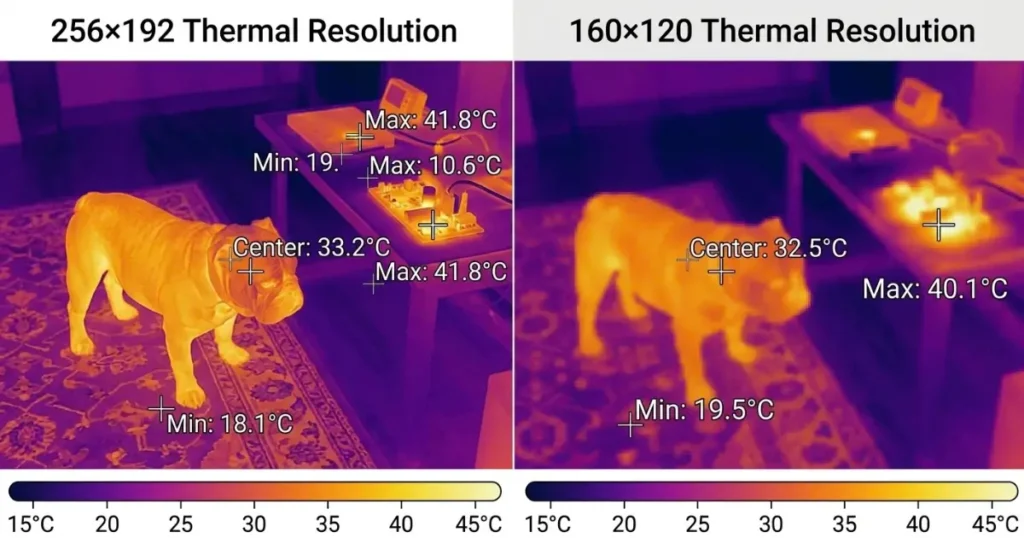
Understanding the Pixel Math
Native thermal resolution describes the number of infrared detector pixels arranged across the image.
| Native Infrared Resolution | Calculation | Total Detector Pixels |
|---|---|---|
| 160×120 | 160 × 120 | 19,200 |
| 256×192 | 256 × 192 | 49,152 |
The difference is 29,952 pixels, giving a 256×192 detector 156% more pixels than a 160×120 detector.
Each detector pixel responds to infrared radiation from part of the scene. The camera processes these signals to produce a thermal image and, in a measuring thermal imager, calculate temperature estimates.
More pixels provide more spatial samples. They do not automatically provide proportionally better temperature accuracy.
What Does Thermal Imaging Pixel Density Mean?
For inspection work, the useful question is how many pixels cover your target.
A small component that occupies only a few pixels may blend with its surroundings. Increasing the number of pixels on that component can make its thermal pattern easier to distinguish.
However, detector resolution alone does not determine target coverage. The lens, field of view, and working distance also matter. Two cameras with the same resolution can place different numbers of pixels on the same object.
How Resolution Affects Image Clarity
The advantage of higher resolution becomes more relevant as the features you inspect become smaller.
For example, a broad heating pattern across a radiator may be visible with either resolution. Distinguishing nearby warm areas on a crowded assembly can be more demanding.
With comparable imaging conditions, 256×192 provides a finer sampling grid. This can help operators identify the location and extent of a thermal anomaly more clearly.
It does not guarantee identification of a particular component fault. A warm area may indicate where further investigation is needed, but the image alone cannot establish that a capacitor is shorted or a terminal is loose.
More Detail Does Not Mean Higher Accuracy
A thermal camera can produce a detailed image while still reporting an inaccurate temperature if measurement conditions are unsuitable.
Accuracy depends on factors including calibration, emissivity settings, reflected radiation, focus, and whether the target adequately fills the measurement area.
Resolution helps address the spatial part of this problem. It should be evaluated alongside the camera’s other measurement specifications.
Resolution and Working Distance: What Buyers Should Know
As the distance increases, a target occupies fewer pixels. This is why a camera that performs well on a nearby object may provide insufficient detail from farther away.
Higher resolution can support greater working distance for a given target when the optics and other conditions are comparable. However, resolution alone does not establish a reliable distance-to-spot ratio or maximum measurement distance.
Ask for the manufacturer’s measurement spot-size guidance. The area required for a reliable temperature reading may span several detector pixels.
For electrical inspections, determine the permitted working position through the applicable site safety procedures. A higher-resolution camera does not establish an electrically safe approach distance.
FLIR’s thermal camera specification guide also explains why resolution, field of view, and focus should be assessed together.
Honeytek TP170 vs TP175: A Practical Resolution Comparison
Honeytek offers both resolution options in its mobile plug-in thermal camera range.
| Published Specification | Honeytek TP170 | Honeytek TP175 |
|---|---|---|
| Native infrared resolution | 160×120 | 256×192 |
| Total detector pixels | 19,200 | 49,152 |
| Spatial resolution | 5.31 mrad | 3.43 mrad |
| Thermal sensitivity | ≤40 mK | ≤40 mK |
| Module weight, excluding phone | 17 g | 15.6 g |
| Listed platform compatibility | USB-C Android | USB-C Android |
Specifications are based on the Honeytek TP170 product page and Honeytek TP175 product page.
The TP175’s higher pixel count and smaller listed spatial-resolution value provide finer spatial sampling. Both models have the same published thermal sensitivity rating, so the resolution upgrade should not be described as an improvement in NETD.
For customers choosing between them, the central question is whether the additional spatial detail will improve their routine inspections.
When 160×120 Can Be the Right Investment
A 160×120 thermal imager can be a sensible starting point when your targets are relatively large and the thermal patterns are clearly distinguishable.
Potential applications include:
- Comparing heating patterns across radiator surfaces.
- Screening accessible equipment housings for temperature differences.
- Investigating broad surface patterns around doors and windows.
- Identifying areas that require closer inspection or another measurement method.
For these tasks, the Honeytek TP170 is worth considering when controlling equipment cost is a priority.
The important test is whether the relevant pattern remains clear at your normal working distance. A lower-resolution camera that answers the inspection question reliably may offer better value than an upgrade that adds little to the decision.
When 256×192 Is Worth Considering
A 256×192 thermal imager becomes more attractive when additional detail helps distinguish neighboring features or document the extent of an anomaly.
Consider the Honeytek TP175 when you regularly need to:
- Compare smaller areas within an assembly.
- Separate adjacent thermal features.
- Examine equipment from a fixed working position.
- Provide customers with images that more clearly locate an observation.
For close-up electronics work, verify minimum focusing distance and suitability for the smallest component you need to inspect. Pixel count alone cannot confirm that a camera will resolve a specific SMD package.
For businesses handling a mixture of general screening and more detailed troubleshooting, 256×192 can offer a useful balance of spatial detail and budget. Its value should be demonstrated on representative targets.
Compare Value Beyond the Purchase Price
A useful thermal camera resolution comparison should include the complete inspection workflow.
Before requesting a quotation, define four requirements:
- Target size: What is the smallest feature you need to distinguish?
- Working distance: Where will the technician normally stand?
- Inspection outcome: Do you need to find an anomaly, compare areas, or record a temperature?
- Documentation: What images and measurements must appear in the report?
Then ask for a demonstration using those conditions.
For smartphone-connected models, confirm compatibility with the exact phone and operating system your team uses. Include any necessary accessories, software, training, and support when comparing costs.
This approach helps you avoid both underspecifying the camera and paying for resolution that does not improve your work.
Find Your Resolution Sweet Spot With Honeytek
Choose 160×120 when broad thermal patterns and larger targets meet your inspection needs. Consider 256×192 when finer spatial detail will help you locate and document smaller features.
Honeytek’s TP170 and TP175 provide two options for matching thermal imaging capability to your budget. Explore the Honeytek thermal imager range and request a recommendation based on your target size, working distance, and reporting requirements.
The right resolution is the one that gives your team enough information to make a useful, repeatable inspection decision.
Frequently Asked Questions
How much better is 256×192 than 160×120 thermal resolution?
A 256×192 detector contains 49,152 pixels, compared with 19,200 for 160×120. That is 156% more pixels. With comparable optics and framing, it provides finer spatial sampling, but the improvement in usable detail depends on the target and inspection conditions.
Is 160×120 enough for professional inspection work?
It can be sufficient for tasks involving larger targets and clear thermal patterns. Suitability depends on working distance, optics, sensitivity, and the required inspection outcome. Professional use does not have a single resolution requirement that applies to every job.
Does higher thermal resolution improve temperature accuracy?
It can reduce problems caused by a target occupying too few pixels, but it does not automatically improve the camera’s specified accuracy. Reliable measurements also require appropriate settings, focus, calibration, and control of reflections.
Is 256×192 suitable for PCB troubleshooting?
It can help locate thermal anomalies on circuit boards, provided the optics, focusing distance, and target size are suitable. It does not guarantee identification of very small components or establish the cause of a fault without further testing.
