
Digital multimeters (DMMs) have become the industry standard for measuring voltage, current, resistance, and other electrical parameters. Compared to analog meters, digital models are more accurate, easier to read, more portable, and often come with enhanced features like automatic polarity indication and overload protection.
In this article, we’ll guide you through the basic usage of a digital multimeter, using the VC9802 model as an example, and highlight important precautions to ensure safe and reliable operation.
Why Choose a Digital Multimeter?
Digital multimeters are now widely used in electronics, automotive diagnostics, HVAC servicing, and household repairs. Here’s why professionals and DIYers prefer them over analog models:
- Higher sensitivity and accuracy
- Clear digital display
- Greater overload resistance
- Compact and user-friendly design
Let’s walk through how to operate a digital multimeter effectively.
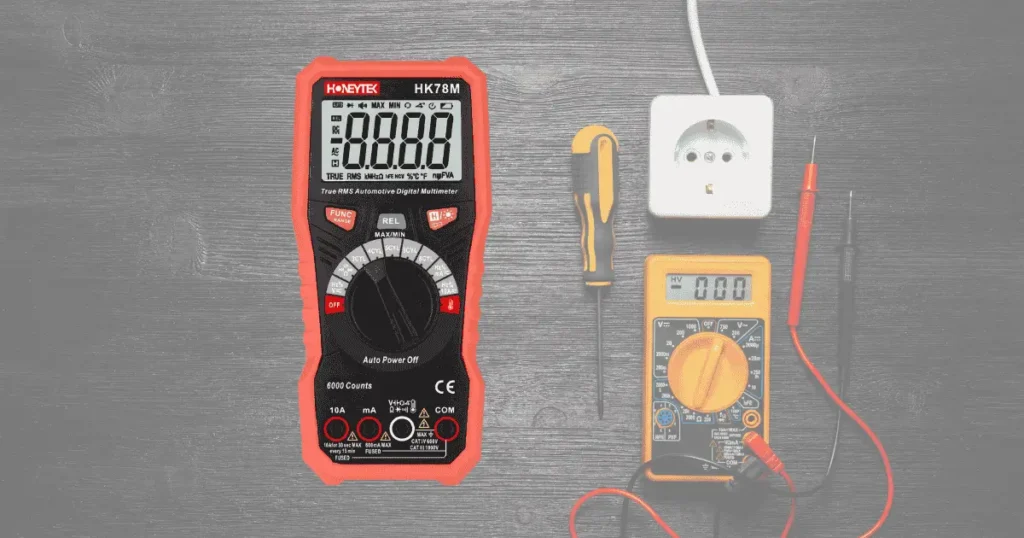
Getting Started: How to Use a Digital Multimeter
1. Read the User Manual
Before operating the device, always read the instruction manual provided by the manufacturer. Familiarize yourself with:
- Power switch
- Range selector
- Input terminals
- Special input jacks (e.g., 10A input)
Proper understanding of the controls helps prevent incorrect usage or equipment damage.
2. Turn On the Device
Flip the power switch to the ON position. Some multimeters also activate automatically when a dial is turned to a measurement setting.
3. Measuring Voltage (AC/DC)
Steps:
- Turn the selector dial to the appropriate DCV or ACV range.
- Insert the red probe into the V/Ω port and the black probe into the COM port.
- Connect the probes in parallel with the circuit.
- The screen will display the measured voltage.
Tip: Always start with a higher voltage range if the voltage level is unknown.
4. Measuring Current (AC/DC)
Steps:
- Turn the dial to DCA (Direct Current) or ACA (Alternating Current) at a suitable range.
- Use the mA port for currents under 200mA, or the 10A port for higher currents.
- Black probe stays in the COM port.
- Break the circuit and connect the multimeter in series with the load.
- The device automatically displays polarity when measuring DC current.
5. Measuring Resistance (Ohms)
Steps:
- Select the proper Ω range on the dial.
- Insert the red probe into the V/Ω port, and the black probe into the COM port.
- Connect the probes across the resistor or component.
- If the resistance exceeds the selected range, the multimeter will display “1”, indicating an overload. Increase the range accordingly.
- Note: In digital multimeters, the red probe is positive, which is opposite to analog meters.
Caution: Always remove power from the circuit when measuring resistance to avoid damaging the multimeter.
Important Precautions for Safe Multimeter Use
To prevent damage or incorrect readings, follow these essential safety guidelines:
a. Start with the Highest Range
If you’re unsure of the expected voltage or current, start at the highest range and step down gradually. After measurement, return the dial to the highest AC voltage setting, and switch off the device.
b. Reading Overload Indication
If the multimeter exceeds full scale, it will display only a “1” on the left digit with no other values—this means you need a higher range.
c. Know the Measurement Type
- For voltage, connect the multimeter in parallel with the circuit.
- For current, connect it in series.
- For DC measurements, most DMMs automatically identify polarity, so manual adjustments are unnecessary.
d. Be Aware of Wrong Mode Use
Accidentally using the DC mode to measure AC voltage, or vice versa, can cause erratic display results like “000” or fluctuating numbers.
e. Do Not Change Range While Measuring High Loads
Avoid switching ranges when measuring high voltage (above 220V) or high current (above 0.5A). Doing so can cause electrical arcing, potentially damaging the internal switch contacts.
f. Watch for Battery Warnings
If you see “BATT,” “LOW BAT,” or “ ” on the screen, replace the battery immediately. Low power can lead to inaccurate readings or device failure.
Final Thoughts: Mastering Your Digital Multimeter
Digital multimeters are powerful, precise, and essential for modern electrical diagnostics. Whether you’re checking a household outlet or testing an electronic component, knowing how to use your DMM properly will ensure accurate results and safe operation.
Remember:
- Use the correct input jacks
- Always start with the highest range
- Never switch ranges under load
- Follow battery and maintenance guidelines
Looking for a Reliable Digital Multimeter?
Explore Honeytek’s range of professional digital multimeters, clamp meters, voltage testers, and more. We offer OEM/ODM support, robust quality, and tools built for both field technicians and electronics hobbyists.
👉 Discover Honeytek Multimeters Now
👉 Contact Us for OEM Solutions
