
What Is a Digital Multimeter?

A digital multimeter (DMM), also known as a multitester, VOM (volt-ohm meter), or simply multimeter, is one of the most essential tools in electronics, electrical work, and industrial maintenance. It combines multiple measurement functions in a single device, allowing technicians to measure:
- DC voltage and current
- AC voltage and current
- Resistance
- Continuity and diode checks
- Capacitance and frequency (in advanced models)
- Semiconductor parameters such as transistor gain (β)
In short, a digital multimeter is the “Swiss Army knife” of electronic measurement tools.
Types of Multimeters
Analog vs. Digital Multimeters
- Analog Multimeter (Pointer Type): Uses a moving needle to indicate readings. Though considered less precise, they are still useful for monitoring trends or fluctuating signals.
- Digital Multimeter (DMM): Displays readings in numeric form on an LCD screen. Offers higher accuracy, auto-ranging functions, and additional measurement features.
Common Measurement Ranges
Most digital multimeters come with four essential ranges:
- AC Voltage (V~)
- DC Voltage (V—)
- DC Current (A—)
- Resistance (Ω)
Some advanced models expand this list to include temperature, frequency, and even Bluetooth data logging.
Components of a Digital Multimeter
A digital multimeter typically consists of:
- Display (LCD Screen): Shows measurement results, often with additional indicators for mode, polarity, and unit.
- Measurement Circuitry: Includes voltage dividers, shunt resistors, rectifiers, and an A/D converter for accurate readings.
- Selector Switch (Rotary Dial): Allows users to select the measurement type and range.
- Input Terminals: Typically include:
- COM (common ground, usually black)
- VΩmA (for voltage, resistance, and small current)
- 10A (for high current measurement)
- Protective Fuses and Internal Battery: Ensure safe operation and power for resistance/capacitance measurements.
How Does a Digital Multimeter Work?

Measuring DC Current
The DMM uses a shunt resistor to divert current. The voltage drop across the resistor is converted to a current reading.
Measuring DC Voltage
A series resistor (voltage divider) is placed before the measurement circuit to safely measure high voltages.
Measuring AC Voltage
Since the meter’s circuitry works with DC, an AC-to-DC rectifier converts AC into DC, which is then displayed.
Measuring Resistance
An internal battery sends a small current through the resistor under test, and the resulting voltage drop indicates resistance.
How to Choose the Right Multimeter
When selecting a multimeter, consider:
- Measurement Range:
- Auto-ranging DMMs are user-friendly and prevent overload.
- Manual-range DMMs give technicians more control in specific scenarios.
- Accuracy:
- For precision electronic work, look for meters with ±0.5% or better accuracy.
- For general household use, ±1% accuracy is usually sufficient.
- Features:
- Basic models: voltage, current, resistance.
- Advanced models: capacitance, temperature, frequency, data logging.
- Brand and Quality:
- A reliable manufacturer like Honeytek ensures durability, accuracy, and after-sales support.
- Price Range:
- Entry-level: affordable, suitable for DIY users.
- Professional: higher price, but better safety ratings, CAT certifications, and longer lifespan.
How to Use a Digital Multimeter
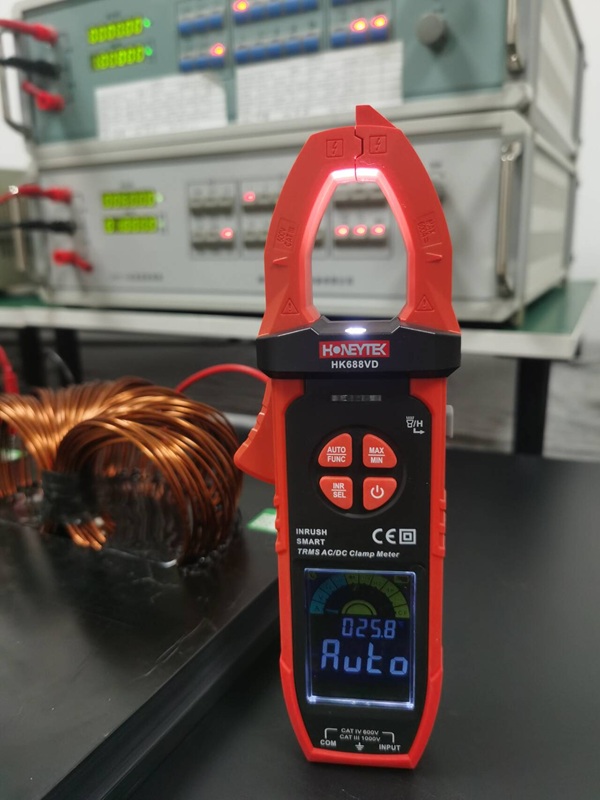
Measuring Current
- Turn off circuit power.
- Break the circuit so the DMM can be inserted in series.
- Insert black lead into COM, red lead into 10A or mA socket.
- Select DC or AC current mode.
- Power on the circuit and take the reading.
Measuring Voltage
- Select voltage mode (DC or AC).
- Black lead → COM, red lead → V input socket.
- Place probes across the component or power source.
- Read the display.
⚠️ Caution: Never switch ranges while measuring high voltage.
Measuring Resistance
- Turn off circuit power.
- Set dial to Ω.
- Black lead → COM, red lead → Ω input.
- Place probes across the component.
- Read resistance value.
Measuring Capacitance
- Discharge the capacitor.
- Select capacitance mode (F).
- Insert capacitor leads into the test socket or touch with probes.
- Read the displayed capacitance.
Continuity Testing
- Select continuity mode (diode/beep symbol).
- Touch probes across a wire or circuit.
- If closed (short circuit), the meter beeps.
Safety Tips When Using a Multimeter
- Always start with the highest range, then step down.
- Never touch probe tips while measuring live circuits.
- Place the meter on a flat surface to avoid reading errors.
- Disconnect probes before changing the measurement mode.
- Double-check polarity in DC measurements.
Multimeter Maintenance Tips
- Turn selector to OFF after use.
- Remove the battery if storing for long periods.
- Clean with a damp cloth, not harsh chemicals.
- Replace blown fuses only with the same type and rating.
- Keep in a dry, cool environment to prevent moisture damage.
Common Multimeter Problems and Fixes
- No Display on Power-On
- Possible causes: dead battery, blown fuse, or faulty LCD.
- Abnormal DC Voltage Readings
- Likely due to A/D converter input issues.
- Incorrect Resistance Measurements
- Caused by dirty selector switch or faulty thermistor.
- Capacitance Function Failure
- Possible IC failure (e.g., ICM7556).
- Large Measurement Errors
- Usually from poor switch contact—clean with alcohol.
FAQs About Digital Multimeters
Q1: Can I use a digital multimeter to test car batteries?
Yes. Select DC voltage mode and measure across the battery terminals.
Q2: What is the difference between an auto-ranging and manual multimeter?
Auto-ranging selects the best measurement range automatically. Manual requires user selection.
Q3: Why does my multimeter show negative voltage?
This means the probe polarity is reversed—swap the red and black leads.
Q4: Can a multimeter test AC current directly?
Basic models typically cannot. You need a clamp meter or specialized adapter.
Q5: How often should I calibrate my multimeter?
For professional use, once every 12 months is recommended.
Conclusion
A digital multimeter is an essential tool for electricians, engineers, and electronics hobbyists. From measuring simple voltage to diagnosing PLC faults in industrial systems, it plays a critical role in maintenance and troubleshooting.
If you’re considering upgrading or purchasing a reliable multimeter, choose Honeytek—a trusted manufacturer of electronic measurement tools known for accuracy, durability, and innovation.
👉 Explore Honeytek’s professional multimeter lineup today and take the guesswork out of measurement!
